Split Task
If you are looking for a way to distribute your transcodes across multiple instances, there are two options:
split_tasksegmented_renderingread more here
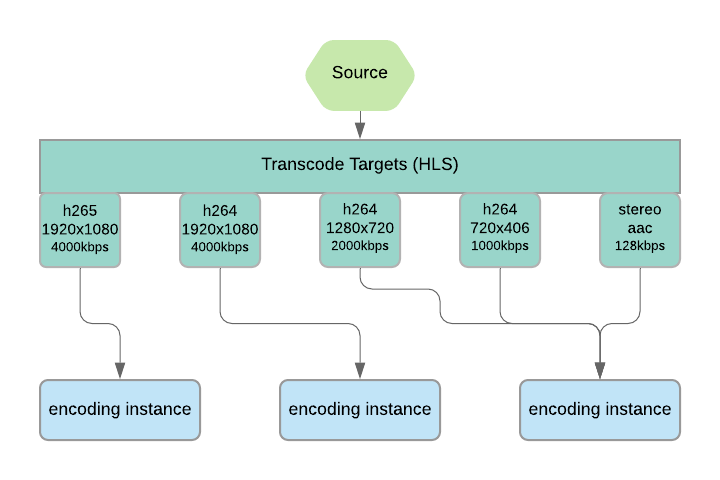
transcode_auto_split can be applied as a job_modifier task to split up encoding of multiple targets in a transcode task. This will distribute the targets across multiple instances for the purpose of completing a job more quickly. It can also be combined with segmented_rendering for further parallelization and control.
Possible values are:
smart- This will attempt to distribute more resource-intensive encodes to their own instances and group lighter encodes together.
aggressive- This will spread every transcode target to its own instance. This is useful if you have many resource-intense encodes
Visual Guide
Here is a visual representation of what is happening when using each of the transcode_auto_split options.
Mode: smart
{
    "uid": "job_modifier_task",
    "kind": "script",
    "payload": {
        "kind": "job_modifier",
        "payload": {
            "modifiers": [
                {
                    "kind": "transcode_auto_split",
                    "target_element_uid": "transcode_task",
                    "mode": "smart"
                }
            ]
        }
    }
},
Mode: aggressive

{
    "uid": "job_modifier_task",
    "kind": "script",
    "payload": {
        "kind": "job_modifier",
        "payload": {
            "modifiers": [
                {
                    "kind": "transcode_auto_split",
                    "target_element_uid": "transcode_task",
                    "mode": "aggressive"
                }
            ]
        }
    }
},
No Split
 This is the default behavior when the job contains no split task modifier
Instance Size
It is important to balance appropriate instance sizes when using the split modifier. You may not want to go from a single transcode task on a massive CPU instance to spreading out every transcode target on their own massive instance. You would likely want to send the job to a series of medium-powered instances instead. Read more on Machine Performance.
Examples
- Split Task Example
- See Segmented Rendering for temporally segmenting transcodes